
What Business Central Support Should Actually Include
Discover what Business Central support should include post-go-live, how cloud and on-premise tracks differ, and how to choose the right partner in Lebanon and KSA.
AI-generated header image for: What Business Central Support Should Actually Include
Most businesses running Microsoft Dynamics 365 Business Central assume their support agreement covers everything they need. Then a critical process breaks down, a user cannot figure out a key workflow, or a system update causes unexpected issues, and suddenly the gaps become very clear.
The reality is that not all business central support is created equal. Some providers offer little more than basic troubleshooting, leaving your team to figure out the rest on their own. Others deliver a comprehensive partnership that keeps your system running efficiently and your people confident in how they use it.
So what should you actually expect from a quality support arrangement? In this post, we break down the essential components that distinguish genuinely effective support from the bare minimum. Whether you are evaluating your current provider, planning to switch, or setting up support for the first time, this list will help you ask the right questions and set the right standards. By the end, you will have a clear picture of what strong, reliable support looks like in practice.
The Real Cost of Inadequate Business Central Support
Many organizations treat Business Central support as an optional add-on after implementation. The reality is that inadequate support carries measurable, compounding costs that quietly erode the value of the platform investment.
1. System Downtime Translates Directly to Revenue Loss
For retail and trading businesses processing time-sensitive transactions, unresolved bugs and system unavailability are not minor inconveniences. They represent missed orders, delayed invoicing, and disrupted supply chains. Because Business Central integrates finance, sales, operations, and inventory in a single platform, a failure in one module cascades across all connected functions simultaneously. The cost is rarely isolated.
2. Skipped Updates Create Security Gaps and Break Customizations

Microsoft releases Business Central updates on a structured wave cycle. The 2026 Release Wave 1 is already active with security patches, AI enhancements, and feature updates. Businesses without structured support tend to defer these updates, which creates compounding technical debt. Customizations built on older versions frequently break when updates are eventually forced through without proper regression testing.
3. Compliance Risk Is Immediate for KSA Businesses
Organizations operating in Saudi Arabia face active regulatory exposure without up-to-date ZATCA-aligned configurations. ZATCA's e-invoicing mandate continues expanding in phased waves, and outdated Business Central environments risk generating non-compliant invoices, missing phase-specific configuration updates, and facing audit consequences. This is not a future risk; it is present in 2026.
4. Underutilized Features Silently Drain ROI
Organizations without active support routinely fail to activate capabilities like automated workflows, Power BI integration, and the Copilot AI features introduced in the 2026 release wave. According to Microsoft Dynamics 365 Business Central market insights for 2026, platform benefits are not automatically realized post-implementation. They require deliberate optimization and ongoing guidance to deliver measurable returns.
5. Market Growth Signals That Support Is Now a Core Requirement
The Business Central consultant services market is projected to grow at a CAGR of 6% from 2026 to 2033. As outlined in cost and ROI analysis for SMBs, businesses that delay structured support engagement face escalating costs as the platform evolves. Structured, reliable Business Central support is not a transitional phase; it is a long-term operational necessity.
What Post-Go-Live Business Central Support Actually Covers
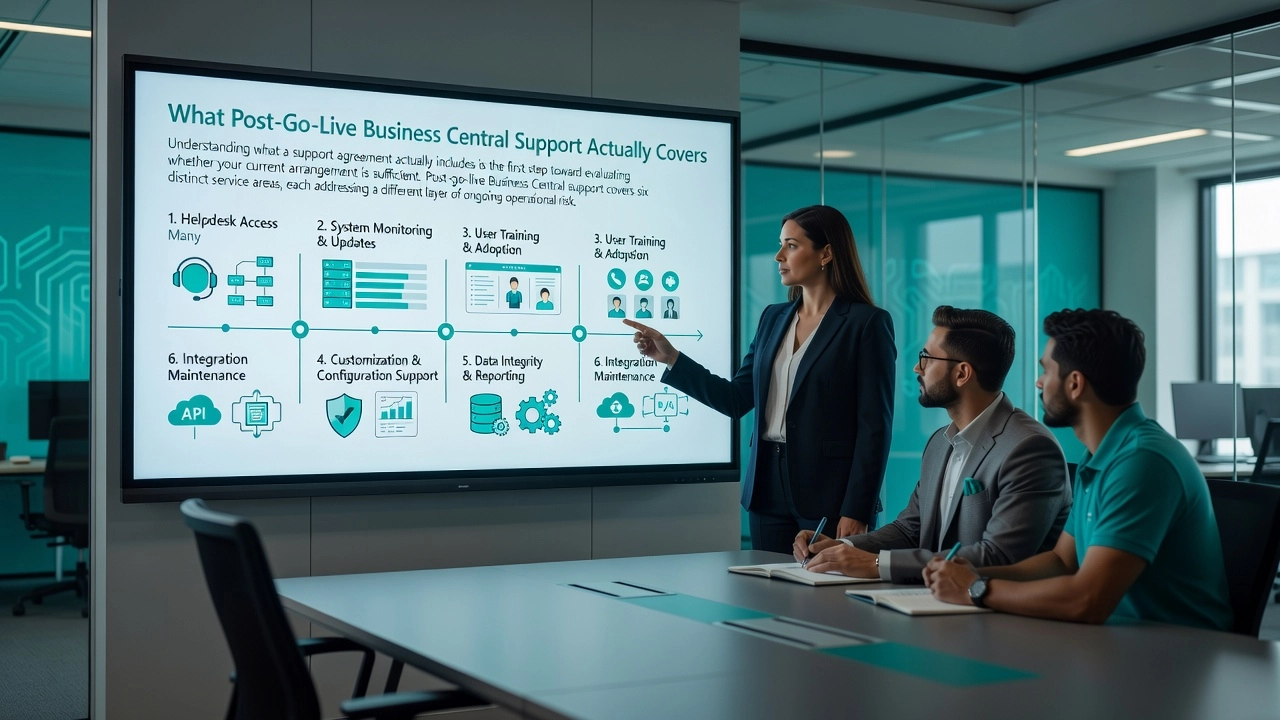
Understanding what a support agreement actually includes is the first step toward evaluating whether your current arrangement is sufficient. Post-go-live Business Central support covers six distinct service areas, each addressing a different layer of ongoing operational risk.
1. Helpdesk Access Many organizations assume their Microsoft subscription covers day-to-day user support. It does not. Microsoft's own support tier handles product-level escalations and documentation, while responsive helpdesk support for user errors, system queries, and workflow questions requires a separate partner agreement. A well-structured support contract defines tiered response times, distinguishing critical system-down issues from routine guidance requests.
2. Update and Release Management Business Central follows a bi-annual release cadence, with Wave 1 releasing in spring and Wave 2 in autumn. Each wave introduces feature changes, UI updates, and platform-level modifications. A support partner tests your environment ahead of each deployment window, identifies compatibility risks, and schedules updates in a controlled way to prevent production disruptions.
3. Customization and Extension Maintenance Custom AL extensions, third-party add-ons, and integration connectors sit as separate code layers on top of the base application. As outlined in the Business Central implementation guide, each release cycle can alter the base objects these extensions depend on. Regular regression testing and compatibility reviews are non-negotiable components of ongoing support.
4. User Training Refreshes Go-live training has a short shelf life. Staff turnover and Wave-driven feature additions mean initial training becomes outdated within months. Ongoing refresher programs tied to release cycles reduce avoidable support ticket volume and sustain system adoption across teams.
5. Performance Monitoring and Proactive Optimization As transaction volumes grow and data accumulates, query performance and report generation times can degrade gradually. Proactive monitoring identifies bottlenecks and configuration drift before they become visible outages, which is a fundamentally different service from reactive break-fix support.
6. Data Integrity and Reporting Support Financial dashboards and Power BI connections built at go-live can drift out of alignment as chart-of-account structures and business dimensions evolve. Active maintenance of your reporting layer ensures that the numbers your team relies on remain accurate and reflect your current business structure.
Cloud vs. On-Premise Support Tracks: What the Difference Means for Your Business
Your deployment model determines far more than where your data lives. It defines the entire structure of how your Business Central support partner must operate, and choosing a partner who does not understand these distinctions creates serious, compounding risk.
Business Central Online (cloud) runs entirely on Microsoft's managed infrastructure. Updates are not optional. Microsoft pushes two major release waves annually, Wave 1 in April and Wave 2 in October, and tenants cannot defer these indefinitely. A capable support partner on the cloud track must maintain a continuous update readiness cadence, testing extensions for compatibility in sandbox environments, scheduling user acceptance testing windows, and ensuring no customizations break ahead of each release. This is proactive, structured work that happens between releases, not in response to them.
Business Central On-Premise shifts control to the organization, but that control comes with full responsibility for server maintenance, SQL patching, security updates, and version management. A support partner handling an on-premise deployment must carry both functional ERP expertise and infrastructure competency. Without a disciplined update schedule enforced by a qualified partner, organizations accumulate version lag and technical debt that makes any future migration significantly more complex. You can review a detailed 2026 comparison of cloud vs. on-premise deployment considerations to understand the operational tradeoffs in full.
The NAV phase-out is no longer a future concern. As of mid-2026, Microsoft has issued a formal migration advisory for customers on Dynamics NAV, and extended support for NAV 2016 has ended, leaving those systems without security patches or ISV compatibility. A partner who simply extends maintenance on an end-of-life platform is not providing adequate support; they are delaying an inevitable failure. Businesses still on legacy NAV need a partner with a structured migration methodology, not a reactive maintenance arrangement.
For Middle East businesses, this is particularly pressing. Many organizations across Lebanon, Saudi Arabia, and the broader region adopted Dynamics NAV during the 2010 to 2018 infrastructure build-out period. These deployments are often heavily customized, and migrating them to Business Central Online involves more than a standard upgrade. Hybrid transition support encompasses cloud readiness assessments, data migration planning, conversion of legacy code to modern AL extensions, parallel-run coordination, and compliance validation against local requirements such as VAT and e-invoicing mandates. This is a distinct service track, not a variation of standard helpdesk support. Understanding how to choose the right deployment option is a critical first step before engaging any migration partner.
Choosing the wrong support track, or a partner unfamiliar with the differences, leads to missed update windows, unsupported customizations, and migration failures that damage confidence in the entire ERP investment. The support model must match the deployment reality from day one.
AI Readiness Is Now Part of What Business Central Support Must Deliver
The 2026 release waves of Microsoft Dynamics 365 Business Central have fundamentally changed what competent support looks like. BC28 (2026 Release Wave 1, covering April through September 2026) embeds AI as a first-class platform pillar, not a peripheral module. The 2026 Wave 1 release plan lists "Copilot and agents" as a named feature category alongside Financial Management and Supply Chain, reflecting a structural shift in what the platform is expected to do. Practical AI capabilities now include the Expense Agent, which accepts receipts via email, extracts data automatically, identifies duplicates, and posts reimbursements without manual intervention. These are not experimental features. They are embedded in standard modules and active in production environments today.
BC29, as the forthcoming Wave 2 release, extends this trajectory further by enabling organizations to design and deploy custom AI agents directly within the platform. This introduces meaningful implementation risk. A client who attempts to configure a custom agent without proper guardrails can inadvertently compromise data integrity, disrupt workflow logic, or create compliance exposure. Support partners who cannot guide that process are not equipped to protect the client or the system. The Dynamics 365 Business Central 2026 Wave 1 feature overview confirms that leading Microsoft partners have already restructured their service offerings to include AI Readiness Assessments and Copilot Agent toolkits as discrete services, meaning partners who have not done so are already behind the market curve.
AI readiness assessments are becoming a standard component of proactive support engagements. A thorough assessment evaluates whether a client's data quality is sufficient for Copilot to return reliable outputs, whether their licensing tier supports activation, and whether their current system configuration aligns with the consent and governance requirements introduced in BC28. Version-specific knowledge is now a legitimate buying criterion. A support partner unfamiliar with BC28's "Copilot and agent capabilities" page cannot correctly configure geographic data routing settings, and a misconfiguration can either block Copilot entirely or route sensitive business data to an external Azure region without proper consent documentation.
For businesses operating in Lebanon, Saudi Arabia, and the broader Middle East, this last point carries direct regulatory weight. Middle East-hosted BC environments may require cross-geography consent to activate Copilot, as local Azure OpenAI endpoints are not yet listed for GCC regions. Organizations operating under Saudi Arabia's Personal Data Protection Law or UAE data protection legislation face compliance questions that sit above the platform itself. A qualified support partner must understand both the version-specific platform behaviour and the regional regulatory context simultaneously, and should direct clients to legal counsel where the intersection of those two areas requires formal review.
Industry-Specific Support Needs Vary More Than Most Businesses Expect
The industry you operate in shapes your Business Central support requirements more profoundly than most businesses realize when they first sign a support agreement. A partner who excels at supporting a distribution company may be systematically underprepared for a retail client, and vice versa. Understanding where these gaps emerge is essential before committing to any support arrangement.
Retail and Fashion: Dual-Layer Support Is Non-Negotiable
Retail and fashion businesses running LS Central carry a layered technical dependency that standard Business Central support simply cannot address. Support scope must extend beyond BC financials to cover POS terminal configurations, loyalty programme logic, and real-time inventory synchronisation between individual store locations and the central warehouse. Each Business Central update cycle introduces potential disruption to the LS Central extension layer, and a partner without competency in both platforms will be unable to diagnose POS failures, loyalty accrual errors, or stock synchronisation breakdowns. These are not edge cases; they are daily operational risks.
Manufacturing: Operational Depth Beyond Finance
Manufacturing clients require ongoing support that reaches into production orders, bills of materials, capacity planning, and shop floor data entry. These modules sit well outside the standard financial footprint of Business Central, and resolving issues involving routing configurations or work centre capacity mismatches requires genuine operational knowledge. A support partner whose experience is concentrated in financial or trading implementations will consistently struggle in a manufacturing environment.
GCC Trading Companies: Compliance Complexity as a Recurring Requirement
Trading companies operating across Lebanon, KSA, and the wider GCC face ongoing support requirements that include multi-currency ledger management, multi-entity consolidation, and ZATCA e-invoicing compliance. These are not one-time implementation tasks. As ZATCA phases continue rolling out and intercompany transactions generate reconciliation issues, a support partner without established GCC localisation experience will be unable to maintain compliance configurations at the required pace.
Professional Services: Project Accounting Has Its Own Update Logic
Professional services firms depend on Business Central's project accounting, time and expense tracking, and resource management modules, which carry distinct update dependencies from supply chain or manufacturing functionality. Update waves that affect project posting profiles or WIP calculation methods can silently disrupt billable revenue recognition if a support partner is not actively tracking module-specific release notes. A commissioned Forrester study on Business Central confirms the platform integrates finance, sales, service, and operations simultaneously, meaning these interdependencies are structural, not incidental.
Narrow Vertical Experience Creates Systematic Gaps
A support partner whose active client base concentrates in one or two industries will carry institutional blind spots when supporting clients outside those verticals. During due diligence, ask directly about the number of active clients by industry, certifications held across verticals, and demonstrated familiarity with industry-specific extensions such as LS Central for retail. Partner capability across the Microsoft ecosystem varies considerably, and vertical depth is one of the clearest differentiators to evaluate before signing any agreement.
Why Local Middle East Business Central Support Delivers Better Outcomes
For businesses operating in Lebanon, KSA, or anywhere across the GCC, the geography of your Business Central support partner is not a minor consideration. It is a structural factor that determines how quickly problems get resolved, how accurately your system reflects local compliance requirements, and how effectively your team actually uses the platform.
1. Timezone alignment determines real-world response speed. Gulf business hours run at UTC+3, meaning that when an issue surfaces at 9 AM in Riyadh or Beirut, a North American support team may not begin their day for another seven to ten hours. By then, your operations have already absorbed the disruption. A locally embedded support team operates within the same working window, enabling real-time collaboration, same-day resolution, and faster escalation when critical issues arise during peak business hours.
2. Regulatory compliance requires firsthand, current knowledge. ZATCA Phase 2 e-invoicing in KSA mandates real-time clearance, XML/UBL formatting, CSID onboarding, and QR code generation integrated directly into Business Central workflows. Lebanon carries its own VAT configuration and reporting requirements. A generalist partner reviewing documentation remotely introduces risk at every compliance touchpoint. Regional partners with Business Central experience built for Middle East SMEs bring configurations that are already tested against local regulatory standards, not assembled from scratch after an issue appears.
3. Bilingual Arabic and English support accelerates adoption. End users who operate primarily in Arabic encounter measurable friction when support is delivered exclusively in English. Misunderstandings during issue escalation, reluctance to engage the support channel, and lower platform confidence all compound over time. Bilingual support reduces all three, and partners who configure Business Central with full RTL Arabic interfaces extend that advantage into daily operations.
4. Data residency requirements must be designed into support architecture. KSA businesses subject to NCA and PDPL data localization requirements cannot treat cloud deployment decisions as purely technical. Microsoft has confirmed its Saudi Arabia East Azure datacenter region will be available for customer workloads from Q4 2026, which directly affects how Business Central's continued cloud growth translates into compliant regional deployments. A local support partner understands how to map deployment architecture against these requirements from the start.
5. Global partner directories leave a visible gap in GCC coverage. Most roundups of Business Central partners are weighted heavily toward North American and European firms. Businesses in Lebanon and KSA searching those lists find limited options with verified local offices, regional case studies, or compliance certifications specific to their market. Locally embedded partners are positioned to fill that gap directly, with the operational context that distant providers cannot replicate.
6. Cultural and operational familiarity reduces configuration errors. Fiscal year structures, government reporting formats, Hijri calendar handling, multi-entity holding structures common in the Gulf, and Saudisation compliance metrics like Nitaqat are all factors that shape how Business Central must be configured and maintained. Partners with direct regional experience incorporate these elements at the design stage rather than addressing them as post-go-live corrections, reducing both cost and delay in support engagements.
How to Evaluate a Business Central Support Partner: A Practical Checklist
Selecting the right Business Central support partner is one of the highest-leverage decisions your organization will make after go-live. Use this practical checklist to assess any partner before committing to an agreement.
1. Verify Version-Specific Knowledge
Ask the partner to demonstrate hands-on familiarity with BC28 and BC29, the 2026 release waves that embed Copilot and agentic AI directly into core workflows. A partner who cannot walk you through the Sales Order Agent, Summarize with Copilot, or the custom AI agent-building capabilities is already operating behind the platform's current direction. Platform knowledge currency is not a soft signal; it is a direct indicator of whether your system will be maintained proactively or reactively.
2. Confirm Support Scope in Writing
Review the agreement carefully to confirm it explicitly covers update management, customization maintenance, training refreshes, and performance monitoring. Business Central releases two major update waves per year, meaning customizations must be re-validated roughly every six months. A contract limited to break-fix helpdesk tickets leaves you exposed to compatibility failures on a predictable, recurring schedule.
3. Assess Industry Depth
Request outcome-based case studies from your specific vertical, whether retail, manufacturing, trading, or professional services. Logo lists are not evidence of capability. A manufacturing deployment involves production orders and capacity planning; a retail deployment involves POS integration and inventory logic. Vertical experience shapes every configuration decision.
4. Check Regional Credentials
Confirm Microsoft certification, local market presence, and active knowledge of country-specific compliance requirements. For KSA operations, this means demonstrated readiness around ZATCA e-invoicing Phase 2, local VAT configuration, and Arabic-language reporting. General localization awareness is not sufficient.
5. Evaluate Response SLAs by Priority Tier
Map guaranteed first-response and resolution times against your actual business hours and operational risk windows, particularly month-end close and seasonal peaks. Critical system-down scenarios require fundamentally different commitments than low-priority requests. SLAs that do not reflect your operational calendar offer weaker protection than they appear to on paper.
6. Ask About Support Team Structure
Establish whether you will have a named account contact who knows your implementation or whether every ticket will be handled by a rotating generalist team starting from scratch each time. A dedicated contact who understands your customizations, data model, and business logic resolves issues faster and prevents recurring problems. This is worth negotiating explicitly into the agreement before signing.
Choosing the Right Business Central Support Partner in 2026
Business Central support is not a commodity, and the evidence across every dimension reviewed in this article confirms that clearly. Scope of coverage, local expertise, industry depth, and AI readiness separate partners meaningfully. A business that evaluates support purely on monthly retainer cost is optimizing for the wrong variable entirely.
For organizations operating in Lebanon and KSA, the regional gap is real and consequential. Local compliance requirements, including ZATCA e-invoicing obligations in Saudi Arabia and Lebanese fiscal regulations, demand a partner with direct in-market experience, not generalist knowledge applied remotely. Timezone alignment, Arabic localization, and industry-specific implementation history are non-negotiable criteria at this level of platform complexity.
Before your next renewal or Wave update cycle, audit your current arrangement against the checklist covered in the previous section. Identify specific gaps across SLA responsiveness, AI readiness, and customization maintenance coverage.
Index of Solutions brings specialized, end-to-end Business Central support across Lebanon, KSA, and the wider Middle East, covering implementation, customization maintenance, LS Central retail support, and ongoing managed services built for regional business realities.
Conclusion
Effective Business Central support goes far beyond fixing what is broken. It means having a partner who keeps your system stable, helps your team build real confidence in daily workflows, and responds proactively before small issues become costly problems. The difference between basic troubleshooting and genuine partnership shows up every single day in your operations.
If your current support arrangement leaves your team guessing, struggling through updates, or waiting too long for answers, it may be time to raise your expectations. You deserve a provider who understands your business, not just your software.
Take a close look at what your support agreement actually covers. Ask the hard questions. Demand the full package. When your Business Central environment is backed by the right support, your entire organization runs with greater confidence, efficiency, and peace of mind.